
Examination and Report Card Software
From exam schedule to report card, without spreadsheets
Exam season means timetables, seating, question papers, marks entry and finally report cards, often managed across dozens of spreadsheets. A single formula error can change a student's result.
The examination module of Ultimate School Manager handles the whole cycle in one place. Teachers enter marks subject-wise, results are calculated automatically, and report cards, including the CBSE format, are generated in one click and shared securely with students and parents. Seating plans, admit cards and exam timetables are prepared from the same exam.
Key Features
Exam scheduling
Create exams and tests for each class with dates, subjects, maximum marks and grading rules.
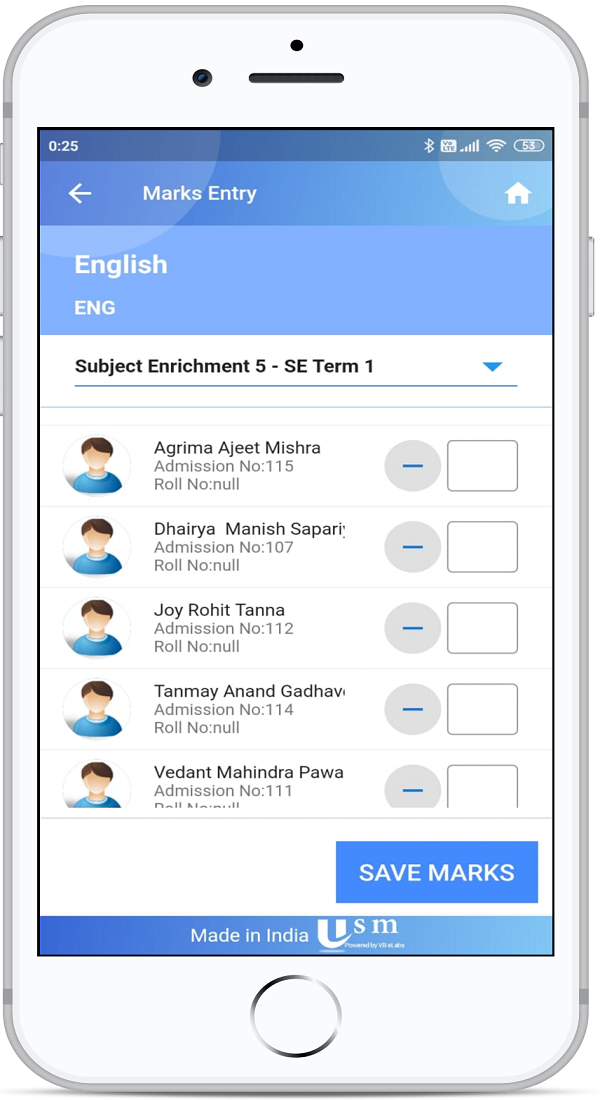
Easy marks entry
Teachers enter marks for their subjects from the web or the USMConnect app; totals and grades are calculated automatically.
Online assessment tests
Conduct online tests with multiple-choice, quiz or descriptive question papers that many students can take in a given time slot.
CBSE report cards
Generate CBSE-format report cards automatically. Report formats can also be configured for your school's own pattern.
Result analysis
Compare performance by student, subject and class to find where extra support is needed.
Secure result sharing
Results and report cards are shared confidentially with each student and parent in the app.
Exam seating plans
Generate room charts and seat slips from hall capacity. Mix classes or mix by roll number, leave gaps, and adjust seats before you print.
Admit cards and room sheets
Print admit cards with theory and practical subjects, and an attendance sheet for the exam date ordered by class or by the seating plan.
Progress and co-scholastic grades
Publish a subject-wise and exam-wise progress chart, record co-scholastic grades for the term, and email a school-branded term feedback PDF.
How It Works
- Define the exam, subjects, maximum marks and grading scheme.
- Teachers upload question papers for online tests or enter marks after offline exams.
- USM calculates totals, grades and ranks automatically.
- Publish results and report cards to students and parents in one click.
Benefits for Everyone
For Teachers
For Exam controller
For Students and parents
Frequently Asked Questions
Yes. Ultimate School Manager includes a CBSE report card format, and report layouts can be configured for other patterns your school follows.
Yes. Teachers can create multiple-choice, quiz or descriptive question papers that students attend from the USMConnect app in a set time slot.
Yes. Marks entry is available in the USMConnect app as well as on the web.
Yes. Once published, results and report cards are available to students and parents in the app.
Related Modules
Serving schools and colleges across India. Learn why Indian schools choose USM